| assets | ||
| components | ||
| data | ||
| main | ||
| .clang-format | ||
| .editorconfig | ||
| .envrc | ||
| .gitignore | ||
| .prettierignore | ||
| .prettierrc.json | ||
| CMakeLists.txt | ||
| dependencies.lock | ||
| flake.lock | ||
| flake.nix | ||
| partitions.csv | ||
| README.md | ||
| sdkconfig.defaults | ||
| tasks.py | ||

DMX-Interface
Art-Net interface for controlling DMX devices via WiFi or Ethernet.
🛒 Parts
| Count | Part |
|---|---|
| 1x | ESP32 |
| 2x | RS485 |
| 1x | W5500-ETH |
| 1x | LED-Button |
| 1x | ♂️-DMX-socket |
| 1x | ♀️-DMX-socket |
Additionally you need:
some wires,soldering equipment,3D-printer,small screws,shrink tubing,hot glue gun
📱 Implemented microcontrollers
- Lolin S2 mini
- ESP 32 WROOM
- ESP 32 C3
For other microcontrollers you may need to adjust the
platformio.ini
🔌 Wiring
You have to short-circuit R0 on the RS485 boards to enable the termination resistor required for DMX before the first and after the last device in line.
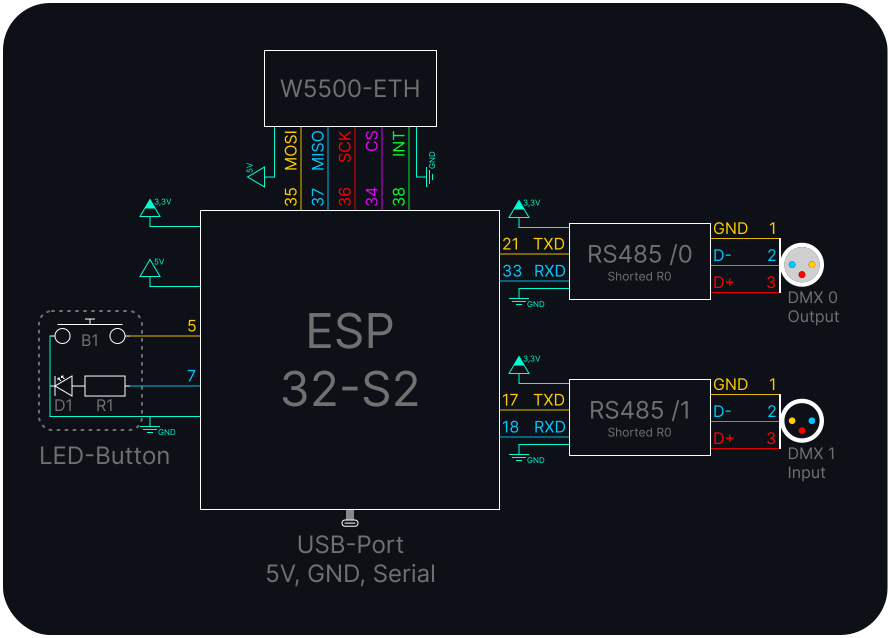
| GPIO | Usage |
|---|---|
| GND | GND to others |
| 3,3V | VIN on RS485 |
| 5V/VBUS | VIN on W5500 |
| 0 | Onboard Button |
| 5 | Ext. Button |
| 7 | Ext. LED |
| 15 | Onboard LED |
| 17 | U1TXD |
| 18 | U1RXD |
| 21 | U0TXD |
| 33 | U0RXD |
| 34 | SPI CS |
| 35 | SPI MOS |
| 36 | SPI SCK |
| 37 | SPI MISO |
🚀 Installation
- make sure you have PlatformIO installed
- open the project folder in PlatformIO
- click
Upload Filesystem Image - click
Upload and Monitor - 🏁 you are done 🎉
🧑💻 Development
Required tools
ESP-IDF(includesidf.py)Python 3invoke(for project tasks)- Optional but recommended formatters:
clang-formatblackprettiersvgonixfmt
Environment setup
This repository includes a flake.nix with a ready-to-use development shell.
nix develop
Alternatively, you can use direnv to automatically enter the development shell when you cd into the project directory.
Without Nix, install ESP-IDF and Python dependencies manually (especially invoke) and ensure idf.py is available in your shell.
Run invoke --list to see all available tasks.
Examples:
invoke flash
invoke reset
invoke config
📦 Case
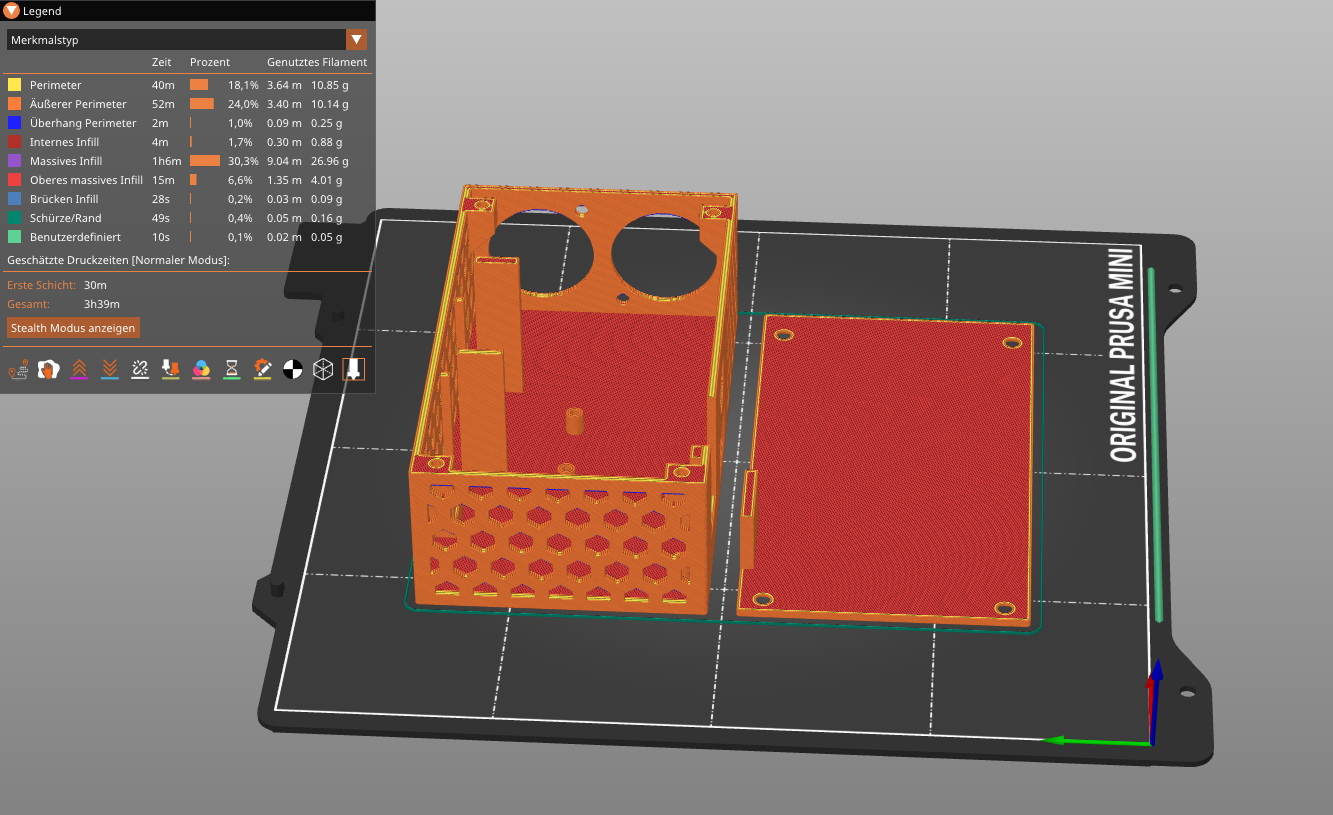
All print files (STL, STEP, X_T) can be found in assets/case. Alternatively you can view the project on OnShape where you can export the files in a format you like.
💡 Status LED
| LED | Description |
|---|---|
 |
no power; LED deactivated |
 |
powered on; normal |
 |
startup; warning |
 |
resetting; error |
⚙️ Default config
To reset the settings, hold down the button and connect the ESP to the power supply, the LED will flash quickly. After 3 seconds the LED should light up static and the settings are reset. If you release the button early you abort the reset and the LED flashes slowly.
| Setting | Value |
|---|---|
| TYPE | WiFi AP |
| SSID | ChaosDMX-□□□□ |
| PASSWORD | mbgmbgmbg |
| IP-Address | 192.168.4.1 |
| DMX1 (Left) | OUTPUT; Universe 1 |
| DMX2 (Right) | INPUT; Universe 2 |
| LED Brightness | 10 % |
🤝 Contributing
Contributions, issues and feature requests are welcome!
Feel free to check the issues page.